Let the Agent learn from its runs
An Agent's Procedure is what you wrote for it. Learned rules are the short corrections that accumulate afterwards - "when a customer gives a date with no year, ask which year rather than assuming" - the things you would otherwise say again in every review.
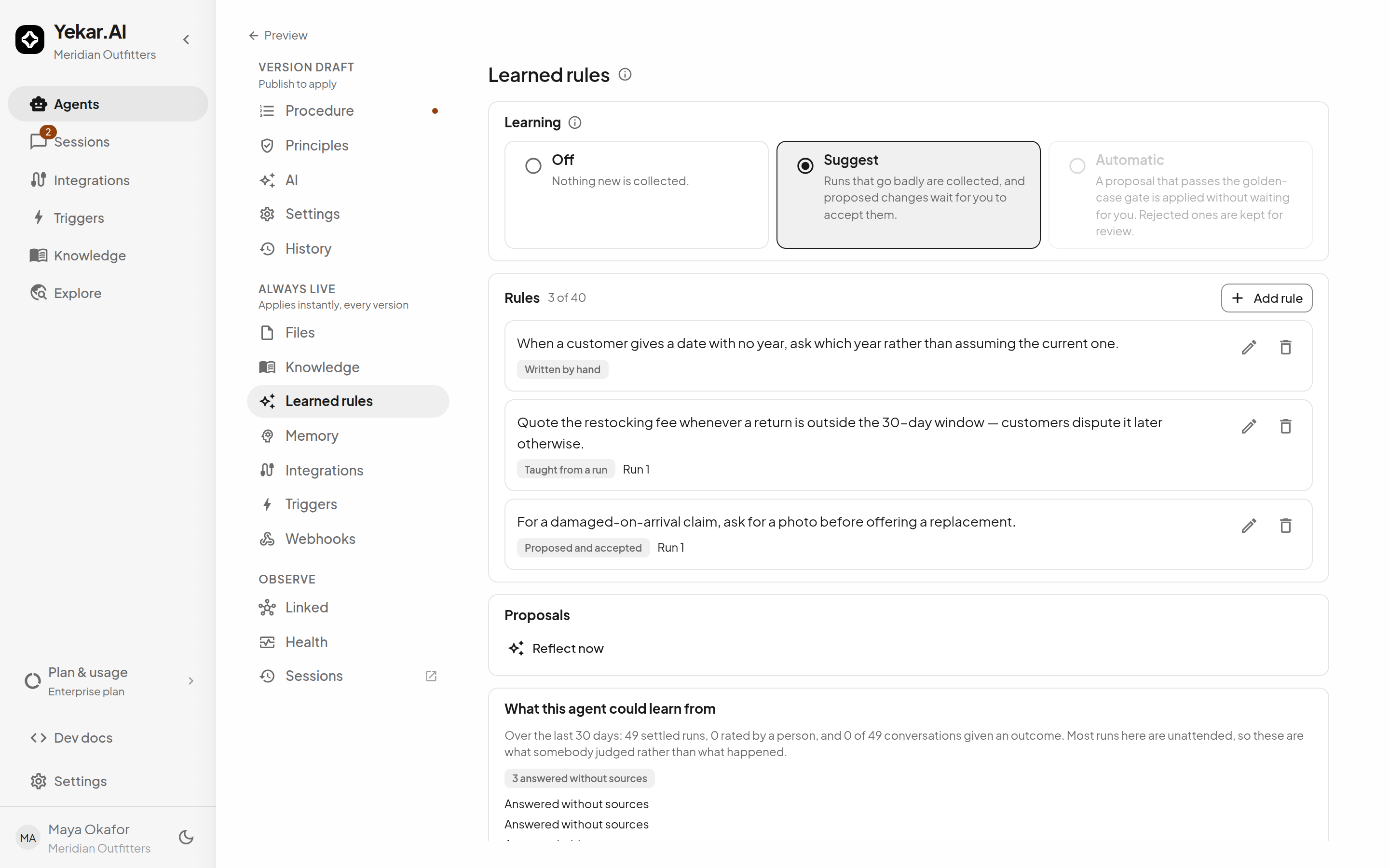
They live in the Learned rules tab of the Agent's Knowledge drawer, beside Files and Knowledge. Every rule is one line the Agent follows on every run, alongside its Procedure, and you decide every one of them: nothing is added without a person accepting it.
What a rule costs you
Rules are live. Like knowledge files, they apply to all versions of the Agent - published ones included - and adding or removing one changes the next run. There is no draft, no publish step, and no publish diff to catch a change before it ships. Removing a rule cannot be undone: no revision holds the old text.
That is the same bargain the Files tab makes, and it is deliberate. A rule that needed publishing would sit in a draft while the mistake it corrects kept happening.
Two limits bound the set: 40 rules per Agent, 400 characters each. Both exist so the rules stay a short list a person can actually read - an Agent that has learned two hundred things has learned nothing you can check.
Writing one by hand
Add rule in the Learned rules tab. Keep it to a condition and an action: what situation the Agent should recognise, and what it should do. A rule with no trigger condition is indistinguishable from a preference and will fire everywhere.
Each rule shows where it came from - Written by hand, Taught from a run, or Proposed and accepted.
Teaching from a reply
Open a conversation, find the reply that went wrong, and press Teach the agent beside the feedback buttons. The dialog seeds a rule and links it back to that run, so the rule carries its evidence: anyone reading the list later can open the conversation it came from.
This is the cheapest path, and usually the best one. The person who noticed the problem is the person who can say what should have happened.
Draft it for me
Not sure how to word the rule? Say in the box what went wrong - "big refunds need the owner" - or leave it empty, and choose Draft it for me. Your organization's AI model reads the reply and the question it answered, and puts a suggested rule in the box: a trigger condition and what the Agent should do, written for the next conversation rather than this one. Edit it as you like, then choose Add rule.
The suggestion is checked the same way a proposed rule is - long enough to be a rule, short enough not to be a procedure - and if it fails, the box is left as it was and you are told to try again or write it yourself. Nothing is added until you choose Add rule, and the rule still records this reply as its evidence. Each draft is one AI call, billed like other AI use. Only people who can edit the Agent see Teach the agent, and only on conversations they can open.
Collecting rules automatically
The Learning control at the top of the tab has three settings. All of them govern collection only - existing rules keep applying whatever it is set to, and removing a rule is what stops it applying.
| Setting | What it does |
|---|---|
| Off | Nothing new is collected. |
| Suggest | Runs that go badly are collected, the Agent looks for lessons in them on its own, and proposed changes wait for you to accept them. |
| Automatic | As Suggest, and each proposal is tested on its own against the Agent's recorded tests and applied when the tests pass. A proposal that fails, or that cannot be tested, waits for you. |
Automatic is unavailable until the Agent has five tests to check a proposal against. It stays visible and greyed out with the Agent's own count beside it, because a gate over one or two tests is a coin toss wearing a verdict's clothes - the floor is what makes the setting safe, not a formality.
When the Agent looks on its own
In Suggest and Automatic, the Agent looks for lessons by itself once enough runs have gone badly since its last look - 20 flagged runs unless you choose another number. The Learning setting says the number in use; Change sets this Agent's own, anywhere from 5 to 500, and clearing it returns to 20. The check runs once a day, and only counts runs from the last 30 days.
Each look is charged like a run: it reads the flagged runs with the Agent's model, on the same key and at the same prices as everything else, so on managed providers it is paid from your credit (see Cost & budgets). While a proposal is waiting for a decision, the Agent does not look again. Reflect now still looks whenever you press it.
What Automatic needs to test on its own
After a look in Automatic produces a proposal, its test starts without anyone pressing Test first - but only when all of these hold:
- The Agent has at least five recorded tests - conversations saved as tests. Only those are replayed on their own: a recorded test answers every tool call from what happened before, while a test you wrote yourself makes real calls, writes included.
- An earlier, finished run of the Agent's tests covered every one of those recorded tests, so there is something to compare with. The comparison uses the same tests on both sides.
- The person who last chose Automatic can still edit the Agent. The test runs as them; choosing Automatic again makes it run as you.
When one of these does not hold, the proposal waits for you, and the Learning tab says which one held it. A proposal whose test passes is applied and marked Auto-added in the rules list; one whose test fails waits for you, and Accept stays unavailable for it.
With collection on, the tab shows three things.
What this agent could learn from
Runs from the last 30 days that ended badly enough to be worth reading - errors, unresolved conversations, replies people marked down, and replies that answered without drawing on any knowledge or tool result. Each links to the run. This is a reading list, not a proposal; nothing here has changed the Agent.
Proposals
Reflect now reads those flagged runs and proposes up to five changes: add a rule, reword one, or retire one that is no longer earning its place. Each proposed change cites the runs it came from, so you can check the evidence before accepting.
A reflection that finds no pattern says so. "No pattern worth a rule" is a real answer - the Agent's bad runs were not all the same problem - and nothing is proposed.
Accept applies the changes to the live rules. Reject asks why, and the reason is kept with the proposal.
The test before you accept
If the Agent has tests, press Test first and they run with the proposed rules applied. The result reads as a comparison - Gate passed - 92% vs 88% now - so you are looking at the change, not at an absolute score. The "now" figure is the pass rate of the newest earlier run that covered the same tests, counted over those tests only.
A proposal that has not been tested says untested rather than claiming a pass, and untested never blocks Accept: with no tests to run - or no earlier run of them to compare against - the tests have nothing to say about the change, and calling that a pass would be a verdict about nothing. Only a measured drop of more than 10 percentage points in the pass rate marks the proposal as failed; a smaller movement still passes, because tests judged by checks have real variance and a gate that blocks on any dip teaches people to delete checks.
Knowledge gaps
Separately from rules, the tab lists answers people were happy with that did not come from the knowledge base - the Agent got by on a tool call or on general knowledge where the library was silent. Those are the places the library demonstrably should have covered something.
Add to knowledge drafts an article from the answer that actually worked, copied as it was written. It is always a Draft: nothing reaches a reader of the knowledge base until a person publishes it. The draft is filed under a Learned base and remembers which reply it came from, so the same answer cannot be captured twice.
What never changes on its own
Learning writes to the rules list and nowhere else. An Agent's Principles and Procedure are yours: no proposal can reach them, no reflection can reword them, and nothing you wrote is rewritten in the course of the Agent learning something. Writing the Procedure from a conversation happens only when you choose it, and only into the draft you then review and publish.
Tips
If a rule is not taking effect, check it is still in the list - removing it is the only thing that stops it, and turning collection off does not. If proposals never appear, the Agent may have no flagged runs in the window, or fewer since its last look than its threshold; the What this agent could learn from section says how many there are, and Reflect now looks straight away. See Troubleshooting.